WinCtrl CDU
MobiFlight supports WinCtrl CDU devices with the MobiFlight 11 beta builds. All buttons are automatically available as game controller inputs; however, using the display for output requires additional setup and is only supported with the following aircraft:
| Platform | Aircraft | Supported configurations | Comment |
|---|---|---|---|
| MSFS | Aerosoft CRJ | CPT or FO or CPT+FO | |
| MSFS | Fenix A3xx | CPT or FO or CPT+FO | |
| MSFS | FlyByWire A32NX | CPT or FO or CPT+FO | Requires additional configuration |
| MSFS | FSLabs A321 | CPT or FO or CPT+FO | |
| MSFS | Headwind A339x | CPT or FO | Requires additional configuration |
| MSFS | iFly 737 | CPT or FO or CPT+FO | CPT+FO untested so far |
| MSFS | iniBuilds A340 | CPT or FO | |
| MSFS | Maddog X | CPT or FO or CPT+FO | |
| MSFS | PMDG 737 | CPT or FO or CPT+FO | Requires additional configuration |
| MSFS | PMDG 777 | CPT or FO or CPT+FO | Requires additional configuration |
| MSFS | TFDi MD-11 | CPT or FO or CPT+FO | |
| Prosim | A320 | CPT or FO or CPT+FO | |
| Prosim | 737 | CPT or FO or CPT+FO | |
| X-Plane 12 | FlightFactor 757 | CPT or FO or CPT+FO | |
| X-Plane 12 | FlightFactor 767 | CPT or FO or CPT+FO | |
| X-Plane 12 | FlightFactor 777v2 | CPT or FO or Observer or CPT+FO+Observer | |
| X-Plane 12 | Hotstart Challenger 650 | CPT or FO or Observer or CPT+FO+Observer | |
| X-Plane 12 | LevelUp 737 | CPT or FO or CPT+FO | |
| X-Plane 12 | Rotate MD-11 | CPT or FO or Observer or CPT+FO+Observer | |
| X-Plane 12 | Rotate MD-80 | CPT | |
| X-Plane 12 | ToLiss A319 | CPT or FO or CPT+FO | |
| X-Plane 12 | ToLiss A320 | CPT or FO or CPT+FO | |
| X-Plane 12 | ToLiss A321 | CPT or FO or CPT+FO | |
| X-Plane 12 | ToLiss A330 | CPT or FO or CPT+FO | |
| X-Plane 12 | ToLiss A340 | CPT or FO or CPT+FO | |
| X-Plane 12 | Zibo 737 | CPT or FO or CPT+FO |
To get the beta build and install pre-requisites for CDU display support, take the following steps:
Install the beta build
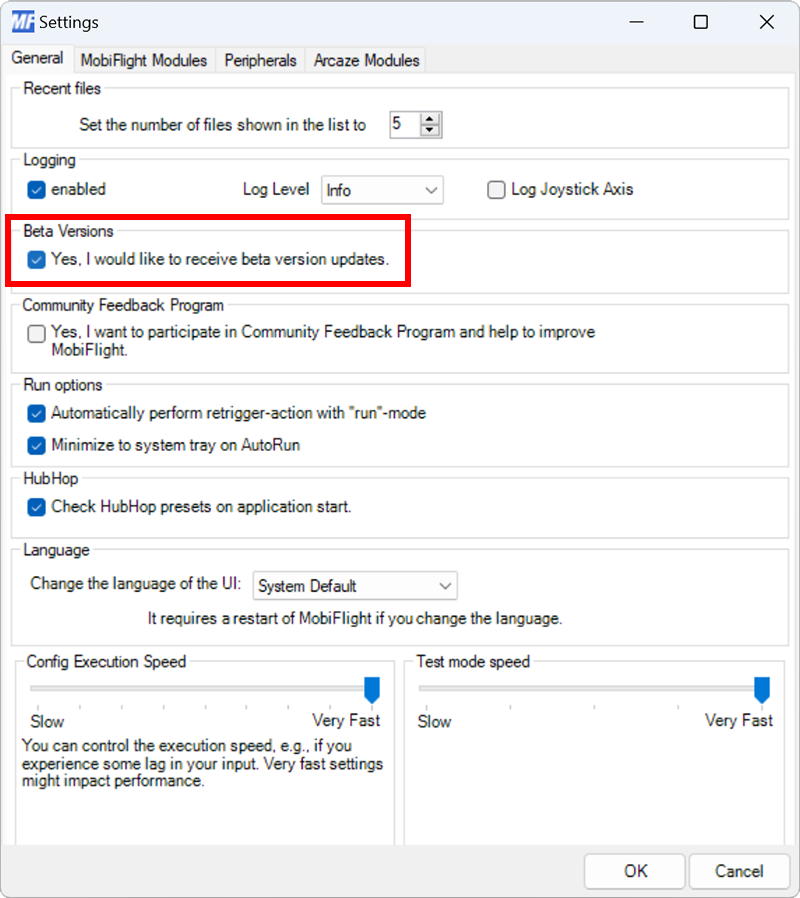
Opt in to the MobiFlight beta by selecting Settings from the Extras menu, then checking the Yes, I would like to receive beta version updates option. Click OK to close the dialog, then restart MobiFlight. The app will prompt to download and install the latest beta.
Configure the aircraft
Some aircraft, such as the PMDG 737 and PMDG 777, require additional configuration. See the detailed aircraft information and follow the appropriate steps for the relevant airplane.
Verify the CDU is detected
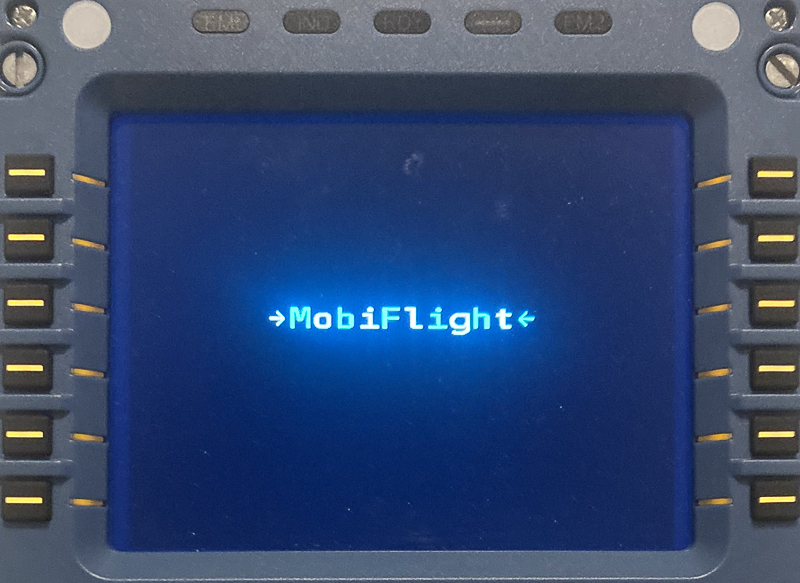
Run MobiFlight, then check the CDU display. If MobiFlight detects the CDU on startup, the CDU display will show –>MobiFlight<–.
Tips
Do not run SimAppPro at the same time as MobiFlight.
MobiFlight relies on the CDU default power-on display settings. If SimAppPro is run before MobiFlight, the display settings are modified and will result in misaligned content. To resolve the issue, close SimAppPro, then disconnect and reconnect the CDU from USB to reset the display settings to defaults.
If multiple CDUs are connected, they need to be assigned separate modes. Use SimAppPro to set each CDU to CAPTAIN, OBSERVER or CO-PILOT mode.
Only default font is supported.